

What is a tracking request?
Your tracking request includes two pieces of data:- Your Bill of Lading, Booking number, or container number from the carrier.
- The SCAC code for that carrier.
What sort of numbers can I track?
Supported numbers- Master Bill of Lading from the carrier (recommended)
- Booking number from the carrier
- Container number
- Container number tracking support across ocean carriers is sometimes more limited. Please refer to the Carrier Data Matrix to see which SCACs are compatible with Container number tracking.
- House Bill of Lading numbers (HBOL)
- Customs entry numbers
- Seal numbers
- Internally generated numbers, for example PO numbers or customer reference numbers.
How do I use tracking requests?
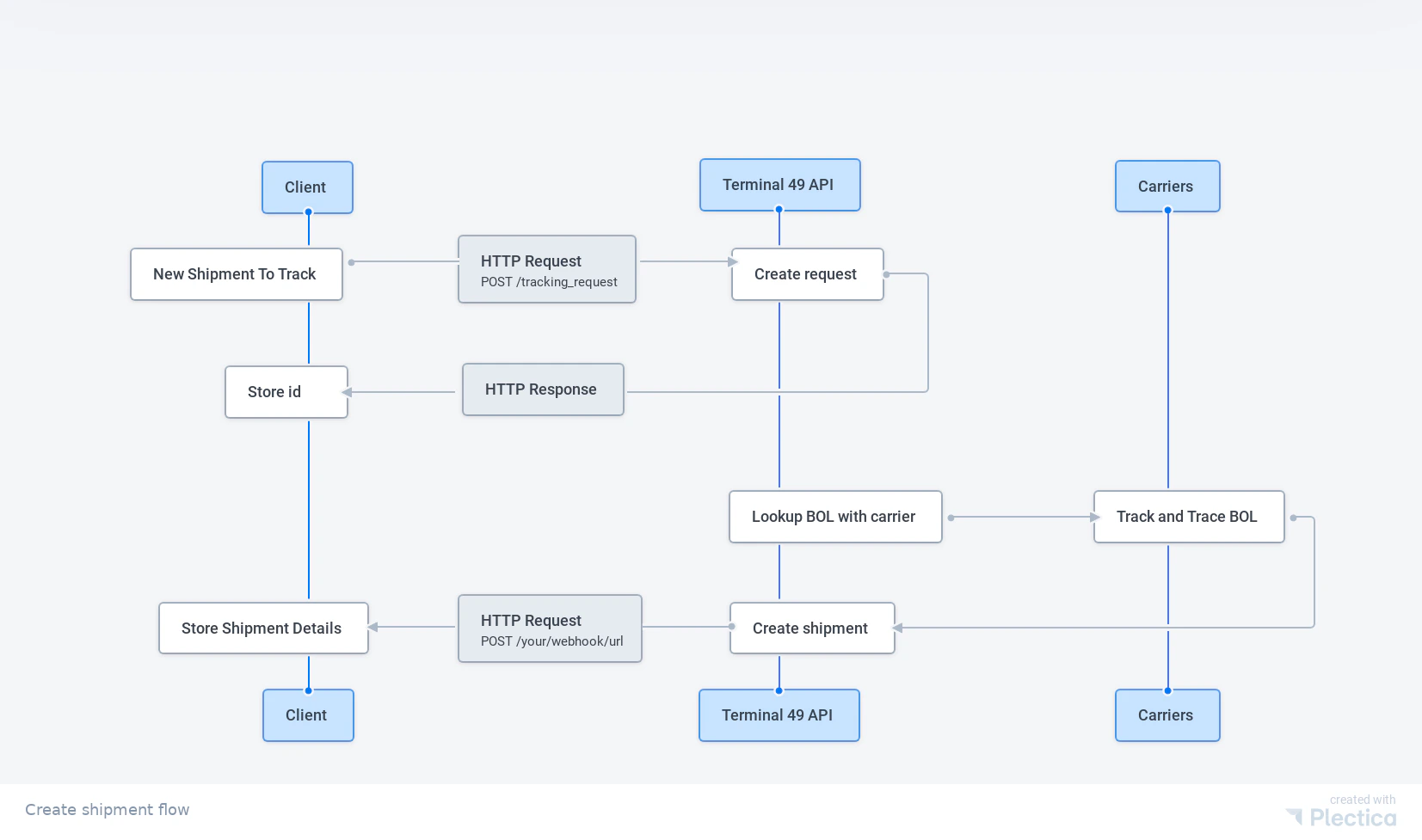
Terminal49 is an event-based API, which means you can use it asynchronously. The general data flow is:- You send a tracking request to the API with your Bill of Lading number and SCAC.
- The API confirms it received your tracking request and returns the shipment data available at that time.
- After you submit a tracking request, Terminal49 automatically tracks the shipment and all of its containers.
- Terminal49 sends updates to the webhook you have registered whenever data changes. Updates typically occur when containers reach milestones. ETA updates can happen at any time. As the ship approaches port, you receive terminal availability data, Last Free Day, and more.
- You can request a list of shipments and containers from Terminal49 at any time. This is covered in a separate guide.
How do you receive tracking request data?
You have two options. First, you can poll for updates. Poll theGET /tracking_request/{id} endpoint to check the status of your request. You only need the tracking request ID, which the API returns when you create the request.
The second option is to register a webhook so the API posts updates as they happen. This is more efficient and the preferred approach, but it requires some setup.
A webhook is a callback URL that receives HTTP POST requests from the Terminal49 API whenever tracking data changes.
When the Bill of Lading and SCAC match successfully, Terminal49 creates a shipment and sends the tracking_request.succeeded event to your webhook endpoint with the associated record.
If there is a problem, Terminal49 sends the tracking_request.failed event.
Authentication
The API uses Bearer Token style authentication. This means you send your API Key as your token in every request. Sign in to Terminal49 and go to your account API settings to get your API token. Send the token with each API request in the Authorization header:How to create a tracking request
Here is JavaScript code that demonstrates sending a tracking requestAnatomy of a tracking request response
Here’s what you’ll see in a Response to a tracking request.Why so much JSON? (A note on JSON:API)The Terminal49 API is JSON:API compliant. JSON:API libraries can translate the response into a full object model compatible with an ORM, which is powerful but produces larger, more structured payloads. If you parse JSON directly, this can feel verbose. For production use, consider adopting a JSON:API client library to get the most out of the format. For this tutorial, you will work with the data directly.
Try it: make a tracking request
Try it using the request maker below!- Enter your API token in the authorization header value.
- Enter a value for the
request_numberandscac. The request number must be a shipping line booking or master bill of lading number. The SCAC must be a shipping line SCAC (see data sources for a list of valid SCACs).
Rate limiting: You can create up to 100 tracking requests per minute.
You can always email us at support@terminal49.com if you have persistent
issues.
Try it: list your active tracking requests
If you have not set up a webhook to receive status updates from the Terminal49 API, you need to poll manually to check whether the tracking request succeeded or failed. Try it below. Click “Headers” and replace<YOUR_API_KEY> with your API key.
Next up: get your shipments
Now that you’ve made a tracking request, let’s see how you can list your shipments and retrieve the relevant data.Go to this
page
to see different ways of initiating shipment tracking on Terminal49.